<?xml version="1.0" encoding="utf-8"?>
<feed xmlns="http://www.w3.org/2005/Atom">
	<title type="html"><![CDATA[CANNY logic forum — Canny 7 Demo kit]]></title>
	<link rel="self" href="https://forum.cannylogic.com/extern.php?action=feed&amp;tid=32&amp;type=atom" />
	<updated>2020-04-10T16:05:23Z</updated>
	<generator>PunBB</generator>
	<id>https://forum.cannylogic.com/viewtopic.php?id=32</id>
		<entry>
			<title type="html"><![CDATA[Re: Canny 7 Demo kit]]></title>
			<link rel="alternate" href="https://forum.cannylogic.com/viewtopic.php?pid=882#p882" />
			<content type="html"><![CDATA[<p>Good morning, sir,<br />Thank you for your answer, everything works.<br />I&#039;ll see you soon.</p>]]></content>
			<author>
				<name><![CDATA[Merlinxav]]></name>
				<uri>https://forum.cannylogic.com/profile.php?id=268</uri>
			</author>
			<updated>2020-04-10T16:05:23Z</updated>
			<id>https://forum.cannylogic.com/viewtopic.php?pid=882#p882</id>
		</entry>
		<entry>
			<title type="html"><![CDATA[Re: Canny 7 Demo kit]]></title>
			<link rel="alternate" href="https://forum.cannylogic.com/viewtopic.php?pid=881#p881" />
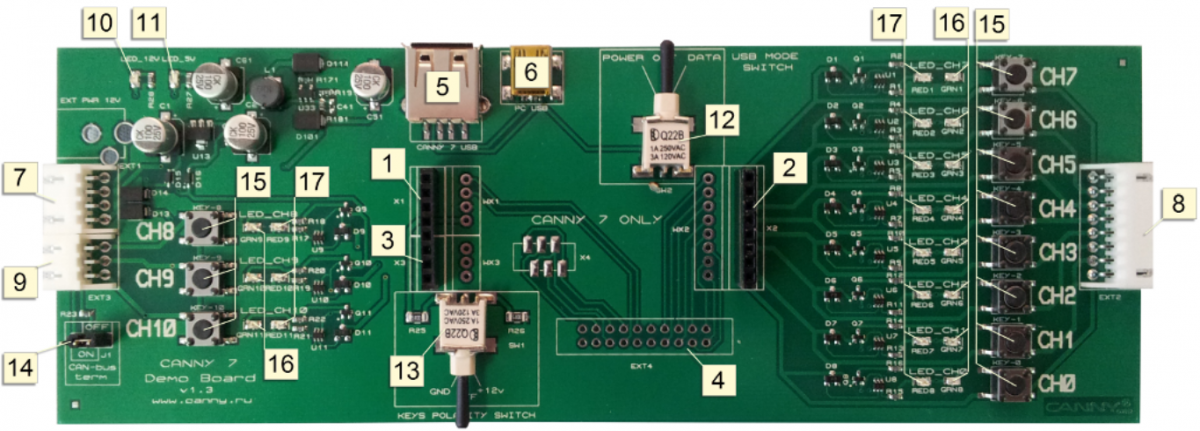
			<content type="html"><![CDATA[<p>You need to prepare Demo Board to work first. Please see <a href="https://wiki.cannylogic.com/index.php?title=CANNY_7_Demo_Kit" target="_blank">https://wiki.cannylogic.com/index.php?t … 7_Demo_Kit</a><br />Upload the firmware and your diagram to controller.<br />Turn the main controller power by setting 3-pos switch on demo board in position Power (see label 12 on picture below)<br />Select the push button polarity by setting 3-pos switch on demo board in properly position (see label 13 on picture belo) <span class="postimg"><img src="https://wiki.cannylogic.com/images/thumb/e/e9/Demo.png/1200px-Demo.png" alt="https://wiki.cannylogic.com/images/thumb/e/e9/Demo.png/1200px-Demo.png" /></span></p><p>Then if you press any push button, voltage with selected polarity will applied to appropriate controller&#039;s channel.</p><p>With attached diagram:<br />Set push button polarity to +12V then press and hold CH0 button for 200 ms or longer and release for 200 ms or longer for switch CH1 output on and off. The controller on-board LED will indicate debounced CH0 state.</p>]]></content>
			<author>
				<name><![CDATA[Konstantin, CANNY logic]]></name>
				<uri>https://forum.cannylogic.com/profile.php?id=2</uri>
			</author>
			<updated>2020-03-25T16:12:11Z</updated>
			<id>https://forum.cannylogic.com/viewtopic.php?pid=881#p881</id>
		</entry>
		<entry>
			<title type="html"><![CDATA[Canny 7 Demo kit]]></title>
			<link rel="alternate" href="https://forum.cannylogic.com/viewtopic.php?pid=880#p880" />
			<content type="html"><![CDATA[<p>Good morning, everyone,<br />I bought a demo kit to learn how to use the cannylab.<br />I can&#039;t get the switches to work in input mode. After several tries I can&#039;t understand how to program this function.<br />I would like for example to use switch 0 in input mode to drive the leds in output mode of channel 1.<br />Can you help me ?<br />I consulted the wiki but I haven&#039;t found the solution.<br />Waiting for your answer.<br />Best regards.</p>]]></content>
			<author>
				<name><![CDATA[Merlinxav]]></name>
				<uri>https://forum.cannylogic.com/profile.php?id=268</uri>
			</author>
			<updated>2020-03-25T10:16:12Z</updated>
			<id>https://forum.cannylogic.com/viewtopic.php?pid=880#p880</id>
		</entry>
</feed>
